Showing posts with label Free Software. Show all posts

Monday, February 12, 2007

Making PDFs with free software and Wii are on the way

Making PDFs with free software

Recently, Adobe announced that it intends to release the Portable Document Format (PDF) 1.7 specification for publication by the International Organization for Standardization (ISO). Also, the editorial in Issue 16 of Free Software Magazine Paper is dead - has PDF followed suit? makes a case about the perceived decline of the PDF format. In my opinion, PDF isn't dead, so this week I've compiled several techniques for making PDF files with free software.

My intention for the postscript was to emphasize content and not the delivery mechanism, and is in subtle defense of FSM dropping their PDF version of their issues. I feel that the medium doesn't matter as much as the message, but one still should take care in selecting the proper delivery method. The Making PDF files entry has done well on digg.com - 851 diggs so far, which I appreciate.

Wii are on the way

My brother, who lives on the west coast, has sent a belated Christmas present after insisting that I shouldn't give him anything this year... a check for a Nintendo Wii. I'm floored; it's an incredible gift, and I really, really appreciate it. So far, no store has any Wiis in stock (but they do have several PS3s collecting dust), but I'll keep trying. Alex, thank you! This really means a lot to me. I will be driving out sometime this summer to visit.

HDR Chernobyl Photos

I highly recommend reading Trey Ratcliff's entry Nuclear Winter in Chernobyl, a description and HDR photo tour of the reactor and Pripyat. It features beautiful, high resolution and haunting imagery of the abandoned power plant, ferris wheel, apartment buildings and playgrounds. If you just want to see the slideshow, they're hosted on flickr.

Monday, February 5, 2007

Unlocking your iPod's potential and building life skills with free software

Managing your iPod with free software

In the end of December of 2006, I wrote my first article for Free Software Magazine. It was accepted, and it was published today in Issue 16.

While iTunes is a powerful application, it does have its limitations, mostly stemming from both Digital Rights Management (DRM) restrictions and the Recording Industry Association of America’s (RIAA) interest in preventing unauthorized copying of music, regardless of fair use and personal flexibility. The free software community believes that the ability to freely copy content you own between your iPod and a computer is a right, not a privilege. I discuss how to fully manage the content on your iPod using completely free software in Managing your iPod without iTunes.

Using free software to build professional and life skills

I've found that many of the skills I've developed using free software and just plain "doing it myself" has been useful in my professional endeavors. This week at FSM, I considered some of the more abstract fringe benefits of using free software in Using free software to build professional and life skills.

Pikmin 2

I've been looking for good games for the GameCube, and this week I've discovered that Pikmin 2 is a joy to play. You play as two tiny aliens followed by a a crowd of eager-to-please creatures that look and act like friendly carrots. You're on Earth, trying to search out objects that can be used to pay back a loan and save your company. As your company is trying to market the objects, they come up with marketing names, such as "Sunseed Berry" for a strawberry, "Director of Destiny" for a compass, and "Quenching Emblem" for a 7-up bottle cap. The difficulty and learning curve ramp up very appropriately, and overall it's just fun.

Now, if I can wrap my head around Killer 7...

Monday, January 29, 2007

Critiquing the Ubuntu Installer for Windows, Autism

Critiquing the Ubuntu Installer for Windows

My latest entry at FSM is about the Ubuntu Installer for Windows, install.exe. In short, it’s a way to install Ubuntu onto the same file system as Microsoft Windows without repartitioning your drive. Justifications include minimizing the risk of data loss during repartitioning, a more user-friendly installation process, and eliminating the need of burning a CD to install. I analyze the need and justification in Do we need an Ubuntu installer for Windows? This is my most popular FSM entry to date; it made the Digg front page and currently has nearly eleven thousand views.

Short Film about Autism

I highly recommend watching In My Language, a beautifully crafted 8'35" video by an autistic that challenges your perspective and prejudices. It's one of the most powerful pieces of film making I've seen in a very long time, and I applaud the author both for their bravery and for the excellent presentation and editing.

Nine Inch Nails - Beside You in Time DVD

After missing a concert last year due to a scheduling conflict, I've been awaiting the Nine Inch Nails - Beside You in Time DVD, which Amazon has for $13.99 pre-order. That's an excellent deal for live concert footage of the [with_teeth] tour.

Thursday, January 11, 2007

Finding Linux replacements for Windows software, developing with phpMyEdit

When discussing ways to switch to GNU/Linux, one of the biggest difficulties I've found is finding answers to the question, "What can I replace this program with?" It's completely understandable; people don't want to lose functionality. However, Googling for answers can easily lead to confusion and frustration if you don't have the background or knowledge to be able to differentiate between the wheat and the chaff. In my new entry for FSM, I discuss resources that can be used for Finding GNU/Linux replacements for Windows software.

Good news; the article that I wrote for Free Software Magazine has been accepted! Once it's published, I'll link to it here. I'm proud; it's my first real published article, not just an opinion, letter or article in a student publication.

Today, I've been going through my notes, snippets and ideas from the past few weeks and tried to catch up on some back entries (my apologies to the feed subscribers). I've posted everything chronologically, so if you look at the blog itself, it should sense.

Yesterday, I tried using phpMyEdit to develop a forms based front-end to a MySQL database. I've found it to be simultaneously useful, simple, complex, flexible, and limited. It allows for rapid development of CRUD (Create, Read, Update and Destroy) forms, which greatly reduces development time. However, when you want to use an advanced MySQL join or contextual input, you start to find a bit of roughness.

The documentation does a decent, but not thorough job of listing all the functionality. I'm particularly annoyed by the comment, "Note that the above example contains additional features..." yet there are no instructions on how to use the new functionality anywhere else in the manual.

Another issue I have with the documentation is the inclusion of code examples that only apply to "future development" and not the current version... this sort of thing should be in the bug tracker, not the production documentation.

I've asked a question on how to do contextual input on their support forums, and if I get a response, I'll publish it here. Overall, I think phpMyEdit is a good free tool for PHP development.

Wednesday, January 10, 2007

Analyzing President Bush's Speech on Iraq with a Tag Cloud

In the build-up to President Bush's speech on Iraq, I've heard a lot of speculation on what the emphasis of the speech was going to be about, and how the content was going to be less rhetoric and catch phrases and more of a persuasive argument. Out of curiosity and inspired by the US Presidential Speeches Tag Cloud, I used an application I wrote using free tools and scripts that extracts key phrases and words from a document and represents the results as a tag cloud (weighted list). Here are the results of the tag cloud analysis of the transcript of the speech.

Background

One of my tasks as a programmer was to find a way to process a large body of text (committee suggestions), pick out key phrases or words that occurred more often, and display them in an easily understood format. However, if I just did a word count, then I'd get high occurrences of out-of-context nouns, adverbs and verbs, which wouldn't be useful.

Term Extraction

The Yahoo! Developer Network offers a very useful tool as part of their Content Analysis Web Services - Term Extraction. The service "provides a list of significant words or phrases extracted from a larger content." To use the service, you'll need a free Yahoo! Application ID. The only limit on the service is 5,000 queries per IP address per day, which for most users is more than sufficient. To get around some hosting limitations, I used the HTTP POST from PHP without cURL script from netevil.org

As the service provides a unique terms, I couldn't just submit the whole body of text, which would have resulted in a few key words and phrases occurring only once. I had to split the source text into individual paragraphs, submit each paragraph separately, and push each resulting term into an array.

Tag Clouds

A fairly recent innovation in web development has been the use of tag clouds. A tag cloud is an alphabetized way of visually representing the frequency of a word or phrase using font sizes that correspond to precedence, or some other similar emphasis. If a word or phrase occurs more often, it'll be displayed larger than the other members of the list. For more information and the history of tag clouds, read the wikipedia entry.

I combined the Term Extraction with a modified version of the excellent free PHP tag cloud generator from 15tags. The script just counts the occurrences of strings within an array and displays the top few items that occurred the most often in a tag cloud. You can adjust the number of items in the tag cloud; while I've displayed over 100 items, it works best with around 25-30.

Results

I took the committee suggestions, pasted them into the tool, pasted the result into a word processor, added a little formatting, and gave the printed document to my supervisor. She found the results useful and visually interesting; it a good tool for arbitrary analysis, and the resulting tag cloud could be used as the basis of a cover for the report. I think tag clouds are a useful method of visually representing the importance of a term, tag, or key words.

For fun, I also ran the application on some erotic literature and IRC logs. I won't share the results in public, but believe me, it's a hoot.

Thursday, January 4, 2007

Usability, a wii-diculously large response, and GameCube modding

Happy New Year! Sleep is for the weak, so let's get back to business.

Have you ever found a new piece of software that sounds like it's the perfect match for your needs, only to get bogged down by bad documentation or a horrendous interface? Many people will quickly discard programs out of frustration caused by avoidable usability issues. Read about ways software developers can avoid disenfranchising potential users in my Free Software Magazine entry How usability inhibits good software.

The Wii-diculous video has gotten frighteningly popular; over 300,000 views on YouTube so far! I figured I'd get a few thousand hits... Ed, Chris and I are very pleasantly surprised by its success. We're currently planning a follow-up...

Reading over the comments on my entry about learning Ruby on Rails and using generated CRUD forms, I found a nice suggestion; phpMyEdit. It's an "instant MySQL Table Editor and PHP code generator." Thanks to Niraj for pointing it out! I'll take a look at it in the coming weeks.

I've been researching ways to mod my used GameCube... ultimately, I'd like to replicate the functionality that I have with my modded Xbox w/ XBMC; the ability to use home brew (network media player, emulators, Linux) and to play backups.

It looks to me like the easiest solution is to use a XenoGC 2.0 modchip ($15), buy a Gamebit screwdriver (about $8), and a replacement case (around $30) or top (around $20) so I can use full-size DVDs. Also, I should get a GameCube Broadband Adapter, which runs about $20 off eBay (unless I can find it locally).

I've learned a few things... Full-size DVDs apparently reduce the lifespan of the optical drive motor, but the exact amount is up in the air. Also, you can "make" your own Gamebit screwdriver by melting a pen for each screw, but I'd rather just buy the right tool rather than ruining a bunch of pens. Playback of backups is affected by the type of media; adjusting the potentiometer may resolve some skipping issues. Finally, while it's theoretically possible to hack an IDE hard drive into a GC, it's a square peg in a round hole.

However, the more I look at the GameCube homebrew scene, the more I'm second guessing whether or not I should do this. My GameCube is working just fine as a game playing device, and I don't mind having both a GameCube and an Xbox. I can't afford to replace it if I screw up. Oh well...

Thursday, December 21, 2006

Backing up your system, finding balance

My new entry, Backing up your system with free software is up at FreeSoftwareMagazine.com. Originally titled I ain't afraid of Norton Ghost (I'm learning to be more graceful about editorial changes), it describes some free tools and techniques one can use to back up and make an image of their workstation.

I still feel like I'm still fumbling around a bit there. While a weekly writing deadline has been very good for me, I don't think I've quite found the right groove yet at FSM.

Part of the difficultly has stemmed from the definition of "free". I originally thought free meant not having to pay for it, and classified closed-source freeware, no-nag shareware and open source software as free. Their definition is a bit more strict; if it's not open source, it's not truly free. It's a challenge to shift your perspective in that manner, but it's manageable.

My other stumbling block is finding the right equation for success; what's popular? I can't predict what will be hit yet, even looking at other people's work. Sometimes, an entry that I think is substandard will generate tens of thousands of hits, and another that I thought was stellar only gets a few hundred.

Obviously, there's no black and white solution; it's a matter of being in the right place at the right time with the right message.

With this particular definition of free, it's easy to slip into the anti-corporate role, railing against Microsoft or other large companies... extremists are obnoxious, and that's not my style. I feel more moderate; it's okay to find balance, and while I lean in a particular direction, I don't want to go off the deep end. I don't think Steve Ballmer is the devil.

However, I do like the 37signals approach, which is to pick an enemy and make something better than what they're doing. Hence, my title, "I ain't afraid of Norton Ghost" - I intentionally picked a popular commercial package and made it a target, and my weapons were free and open source software. Such a violent analogy and a confrontational tactic, yet that's a proven method of success.

In the end, the entry title was changed but the structure remained the same, and I got an above-average number of hits. So it goes.

I'm putting the finishing touches on my first article for Free Software Magazine... if accepted, it'll be in Issue 16. I haven't forgotten about the home server security, but real life and some other priorities have taken precedence. Also, I've got something big and fun planned in the next day or so...

Thursday, December 14, 2006

KompoZer - Unofficial Bugfix Stopgap for Nvu

My latest entry at Free Software Magazine, KompoZer - Unofficial Bugfix Stopgap for Nvu is now up. Nvu, the free cross-platform WYSIWYG HTML editor reached its acclaimed final 1.0 release in June of 2005. Official development then ceased to allow work on its successor, Mozilla Composer 2.0, leaving users with no bugfixes and patches. The post discusses the history and controversy of KompoZer, the unofficial community stopgap release of Nvu.

I'm really enjoying my week in Manhattan. The Zend PHP Certification boot camp is progressing smoothly, in spite of a delay in getting the official books (we had print outs of the PDF instead, so I had to transcribe all my notes once the books arrived). It's a small class in a small room; only four students and a teacher. However, this kind of setting is well suited for this kind of material and allows more individualized training. I'm fairly confident that I'll be prepared for the exam on Friday.

I've been to the IFC Center twice, the first time on Sunday to see David Lynch's Inland Empire, then last night to see the premiere a new print and revival of El Topo, the "first" NYC midnight movie. Inland Empire was everything that a David Lynch movie could be; emotional, surreal, and building a complex character and structure only to completely break it down without any compassion for the viewer. I liked it, but it was difficult to follow and felt more like an in-joke than a story.

Before Inland Empire, an advertisement for El Topo stated that the 7:20p show would have a special guest, so I bought an advance ticket. As it was John Lennon and Yoko Ono's favorite movie, I guessed that Yoko Ono would be there to say a few words since Lennon was busy elsewhere. The night of the show, they announced that she was supposed to be there, but due to unforeseen circumstances she was unable to attend. Instead, they played a section of Imagine and read a letter from her saying that she wished she could be there and gave her love to the audience. The newly restored print was absolutely beautiful, and I really enjoyed the movie, even more than Inland Empire.

This morning, the New York Post reported that Yoko was the victim of a $2 million extortion scheme from her chauffeur, complete with death threats, videos and photos. I suppose that's a legitimate excuse for not being at the premiere.

After El Topo, I went to Benny's Burritos in the Village, only a few blocks away. I remembered their Mojitos from previous trips and asked for one, only to be politely told that they didn't make them anymore. I ordered a margarita instead, then was pleasantly surprised when the waiter brought over a Mojito, saying the bartender did have the supplies after all. My jerk chicken on a curry tortilla was tasty and what I needed. While Benny's isn't haute cuisine, it is a nice place to get a good meal for a reasonable price with personable service.

Late that night when I was exiting the subway station, I happened to look up. The top Empire State Building was piercing the low-lying cloud cover, reflecting and diffusing its holiday red and green lights in an ethereal mist. I like this city, and I wish I could spend more time here.

Wednesday, December 6, 2006

Visualize Your Disk Usage, Console Hacking

I've posted a new entry titled Visualize Your Disk Usage at Free Software Magazine. Ever wonder about what's been eating up your free space in Windows? Two free utilities that graphically represent disk utilization are analyzed and compared.

Continuing the discussion about subjugating game consoles... Over the last week, hackers have had a field day with the Wii. The WiiMote can be used in Windows using GlovePIE (see this HowTo for the script) and on OSX with DarwiinRemote. There's a video demo of the Wii-Mote controlling Half-Life 2 in Windows. If you're interested in Wii (well, Gamecube) home brew and emulators, check out wraggster's tutorial on how to exploit the GC Action Replay for just that.

PlayStation 3 Linux has also gotten some notice as it's pretty easy to just create an image of a Blu-ray disc, including movies and games. Inevitable and not particularly shocking, but some people just get the wrong idea and think that Linux is a piracy enabler. A tool is a tool; it's up to the user to decide whether or not to use it for good.

I've been teaching myself Ruby on Rails at work. It's turning out to be a great way of making CRUD (Create, Retrieve, Update, and Delete) based applications quickly and easily. I ran through part one of the classic Rolling with Ruby on Rails tutorial, turned around and in less than an hour created a prototype application that would have taken me at least a day to get to the same point in PHP. I do like how it pretty much forces you to use the Model-View-Controller (MVC) design pattern, separating business from presentation. Much to learn and even more to do before it's even close to production ready...

Speaking of PHP, I'm traveling to New York City on December 10th for a week-long Zend PHP Certification Boot Camp. While I've been using PHP and developing applications for a couple years now, it'll be nice to have some formalized training and certification. In my free time, when I'm not studying or visiting friends, I'm planning on watching David Lynch's Inland Empire and maybe even catch Avenue Q, the subversive Sesame Street parody.

I'm currently writing a follow-up for to the How to Configure an $80 File Server in 45 Minutes entry. I'll discuss how to take steps to protect, audit and secure your server. Imagine the relief you'll feel when you eliminate the script kiddie dictionary attacks from your auth.log!

Thursday, November 30, 2006

Why hack your game console?

My first blog entry at FreeSoftwareMagazine.com, Why hack your game console, has been posted. It's a topical overview of why and how game consoles can be utilized and extended using home brew software and Linux. Check it out!

Monday, November 20, 2006

Getting Your Cell Phone Under Control Using BitPim

I had some issues with managing my cell phone.  I had dozens of work contacts that I wanted to import instead of using the keypad to manually enter them.  Also, I had dozens of pictures that I had taken with my phone's camera that I wanted to easily organize and transfer without being charged.  After some research, I found the Mobile Action USB Data Suite - a USB cable, drivers, and syncing software for around $20.  However, I felt the included software was too bloated and limiting.  I installed only the drivers and turned to Google, where I found BitPim.

To quote BitPim.org...

is a program that allows you to view and manipulate data on many CDMA phones from LG, Samsung, Sanyo and other manufacturers. This includes the PhoneBook, Calendar, WallPapers, RingTones (functionality varies by phone) and the Filesystem for most Qualcomm CDMA chipset based phones.

Contacts

The ability to import contacts was what initially brought me to BitPim.  I synchronized the existing contacts from the phone, converted a Excel spreadsheet of contacts into a CSV, and used BitPim's import function.  After some categorizing and tweaking, I transferred the new list with my phone.  I checked, and everything was there as I wanted!  I saved myself from some very tedious data entry.  BitPim's import also supports a variety of different sources for contacts and calendars, including Outlook, Google Calendar, iCalendar, and more.

Images

I wanted to organize the images I had taken with the phone's camera.  Under Media, you can see thumbnails or a detailed list of the images.  I renamed the images and even added some from my computer to use as wallpaper, which BitPim resized automatically.  A quick sync, and now my images were under control.

When importing or exporting, the pictures taken with the camera were under "Wallpaper", even though they're listed under Media - images in the tree view.  Also, if you rename or upload an image, make sure it has the proper file extension (eg .JPG) - my LG-VX5200 will reset when it tries to display an image without the extension.

Ring Tones and Sounds

Many people have custom ring tones... why can't I?  However, I'm cheap and I like to do things myself.  I edit a short sound clip, saved it as a .WAV file, and dragged it into the ringers panel.  BitPim automatically converted the file to MP3 upon import.  One sync later, and I now have a four bar section of "The Gonk" as my ringtone.

Other Functions

The Memo and Todo functionality worked without issue.  Data entry using a computer's keyboard is much faster than using a phone's keypad, which saves time and frustration.  I did not use the Calendar function because we use Meeting Maker, a proprietary format that is notoriously inflexible and nigh-impossible to export.

Conclusion

I feel that BitPim is an excellent, mature program for managing cell phones; it has the functionality and versatility that I needed without the bloat.  The emphasis in this program seems to be function over form; the graphics and layout are bland and cluttered, but it works beautifully.  Best of all, it's open source and free (GPL).  To see if your phone is supported, check their matrix of supported phones and features.

Saturday, November 18, 2006

How to Configure an $80 File Server in 45 Minutes

I use a modded Xbox and Xbox Media Center for playing media files across the network on my television and sound system.  I also download large files, such as Linux ISOs, via BitTorrent.  However, leaving my primary computer on all the time seemed like a waste of energy.  I wanted a cheap, small headless machine that I could use as a Samba server and BitTorrent client so I could leave my workstation off when I wasn't using it.

I was in luck; HCDI Trading had a great "Fall Extravaganza" deal - a Dell OptiPlex GX150 Desktop for $47.91 (around $30 s/h).  The specs:

  • Desktop Form Factor (it fits on a shelf in a media center)
  • Intel Celeron 700 MHz
  • 128MB RAM
  • 10GB HD
  • CD-Rom

Not cutting edge, but perfect for what I needed and priced very reasonably.  Instead of using X11 and remote clients, I felt that web interfaces would be optimal out of simplicity.  If I configured the server as a LAMP (Linux, Apache, MySQL, and PHP), then I could use web GUIs for configuration, administration, and file transfers.

Out of the popular Linux distributions, I'm most familiar with Gentoo and Ubuntu.  Gentoo didn't seem appropriate; it would take hours and hours to get everything set up, configured and updated (even from a Stage 3 install), and any performance gain from the optimization would be negligible.  Ubuntu has a history of reliability and ease of set up, so I used the Edgy Eft release as the basis my server.

The Applications

  • Remote Console - OpenSSH
    • The free version of the SSH connectivity tools.  Use it for secure access to the console.
  • Web Server - Apache
    • It's free, fast, well supported and documented
  • Network Fileshare - Samba
    • Creates file shares that can be easily accessed from Windows.  Notoriously obnoxious to configure by hand, the Samba Web Administration Tool (SWAT) simplifies the process immensely.
  • Database - MySQL
    • The popular free database server.  While I can use a command line to administrate MySQL, I prefer using phpMyAdmin.
  • P2P Client - BitTorrent

Directions

  1. Download and burn the Ubuntu Server 6.10 i386 install CD.
  2. Install Ubuntu Server
    1. When asked about Software Installation, choose LAMP.
    2. When the installation is finished, take out the CD (I flip it over and leave it in the drive for the next time I need it) and reboot.
  3. Logon as the regular user that you created during setup.
  4. Give root a password.
    sudo passwd root
  5. We're going to modify the file sources list to allow us access to all the required files.  Uncomment the edgy universe, edgy-security main restricted, edgy-security universe, edgy multiverse, edgy-backports main restricted universe multiverse, and edgy-commercial main.  In addition, Ubuntu leaves the install CD as one of the file sources after installation, so you'll need to remove the CD from the source list.  Comment out the CD from the list and save.
    sudo nano -w /etc/apt/sources.list
  6. Update apt-get to use the new sources.
    sudo apt-get update
  7. Install OpenSSH server
    sudo apt-get install openssh-server
  8. Turn off the computer.
    sudo shutdown -h now
  9. Disconnect the monitor, keyboard, and set the computer wherever it's going to lurk for the next couple years.
  10. Turn on the computer and wait about a minute for it to boot.
  11. Using your preferred SSH client, connect to the machine.  I prefer PuTTY for Windows.
  12. Install Samba and SWAT.
    sudo apt-get install samba smbfs swat xinetd
  13. Create a Samba user.
    sudo smbpasswd -a username
  14. Add SWAT to the xinet configuration and save.
    sudo nano -w /etc/xinetd.d/swat
    # description: SAMBA SWAT
    service swat
    {
    disable = no
    socket_type = stream
    protocol = tcp
    #should use a more limited user here
    user = root
    wait = no
    server = /usr/sbin/swat
    }
  15. Reload Xinetd with the new configuration.
    sudo dpkg-reconfigure xinetd
  16. Verify that SWAT is up and running.  If you don't get any response, start Googling.
    sudo netstat -tap | grep swat
  17. Make the shared directory for TorrentFlux.
    sudo mkdir /share
    sudo mkdir /share/incoming
    sudo chmod 777 /share/incoming/
  18. Create the Samba share.  Using a web browser, go to http://hostname:901/shares
    1. path /share/incoming
    2. valid users - username
    3. read only - no
    4. Commit Changes
  19. Install phpMyAdmin
    sudo apt-get install phpmyadmin
  20. Connect to phpMyadmin using a web browser - http://hostname/phpmyadmin
    1. Secure MySQL / phpMyAdmin
      1. login: root (no pass)
      2. Privileges
        1. Add a password to both root accounts
      1. Create a database for TorrentFlux
        1. Databases - Create New - torrentflux
  21. Install TorrentFlux
    sudo apt-get install torrentflux
    1. Ignore the libphp-adodb message.
    2. Configure database for torrentflux with dbconfig-common? - yes
    3. Password - blank (generates random)
    4. Restart Apache? - Yes
  22. Configure TorrentFlux using a web browser - http://hostname/torrentflux/
    1. Username / Password - root / root
    2. Configuration
      1. Path - /share/incoming/
      2. Save
    3. Click My Profile
      1. Update your password
    4. Create a user account
      1. Admin - New User
  23. Remove the Apache default documents from web root.
    sudo rm -Rf /var/www/apache2-default/
  24. Create a basic web launchpad for easy access your services.
  25. sudo nano -w /var/www/index.php

    <?php $hostname = $_SERVER['HTTP_HOST']; ?>
    <ul>
    <li><a href="http://<?php echo $hostname; ?>/torrentflux">Torrent Flux</a></li>
    <li><a href="http://<?php echo $hostname; ?>/phpmyadmin">phpMyAdmin</a></li>
    <li><a href="http://<?php echo $hostname; ?>:901/">SWAT</a></li>
    </ul>

Post Mortem

Overall, the installation and configuration took me about 45 minutes to go from zero to a fully functional system.  The Xbox can see the share, and I've got a new playground for web development.  I would suggest cleaning up and securing that home page a bit; research .htaccess files to lock it down.

I put my file server in my media center underneath my router, and it takes up about the same space as a VCR.  For $80, I feel that I've made an excellent investment.

Update - 11.19.2006 - I've been Dugg! Thank you all for your comments, compliments, corrections, criticisms, and suggestions!

Friday, November 17, 2006

The Dojo Javascript Toolkit - Powerful, but Unfinished

Javascript toolkits are collections of tools that provide easy interfaces to both basic and advanced functionality that allow developers to concentrate on the business functionality of their application.  However, some are more polished than others; I'll tell you about a recent experience with Dojo, an increasingly popular toolkit.

I had written a simple PHP application to graph web server statistics, such as HTTP daemons and MySQL connections.  The application utilized JpGraph to generate graphs from tabular data.   The first page provided documentation and the interface to select the services to graph and the date/time range, and the second parsed and displayed the requested information.  For the date and time picker, I used for loops and an array to generate options for the drop-down lists.  It was ugly, but due to the low volume of use, it was enough.

However, as our organization started having more web server performance related issues, we increasingly relied on the tool, and the kludgy user interface became painfully obvious.  Wouldn't it be easier to select a date on a calendar rather than scrolling through an option list?  Can we have all the information and options available on one page, yet have an uncluttered interface?  While it was just a private utility, it needed improvement.

Enter Dojo 0.4, the modular Open Source Javascript toolkit.  A number of useful Widgets in its arsenal included a date picker, time picker, tool tips, and tabbed content.  It seemed like an ideal tool for overhauling the GUI without spending undue amounts of time tweaking, and I had easily utilized the collapsible TitlePane widget in another application.

However, the lack of good documentation quickly became an issue; a number of features or techniques mentioned in the incomplete API didn't work out of the box.

The date and time picker provided to be the hardest to deal with.  The method of retrieving the selected date and the selected time were different and incorrectly documented (DatePicker), if at all (TimePicker).  In addition, there was no documentation on how to ID the individiual widgets for retrieval.

Google searches for documentation found developer discussion threads such as, "Who broke the time picker?" but providing no working examples that worked with a form submission.  I found an email exchange between a user and a developer about another widget that provided the key on how apply an ID, and a third discussion revealed how to actually retrieve the value so it could be POSTed.

Finally, I turned to the source code.  According to a code comment, the published mechanism for getting the DatePicker value was deprecated, and the function for TimePicker was completely different than the DatePicker.
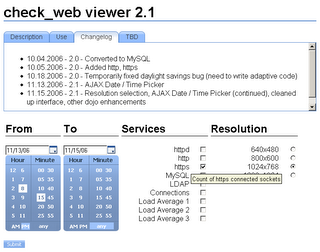
Armed with the information from a variety of hard-to-find sources, I finally got it to function... after wasting several hours researching, experimenting, and adjusting.  Fortunately, the tool tips and tabbed content were much easier to implement than the date/time pickers.

The end result was highly polished, easy to use and beautiful.  I felt drained by the experience; a released toolkit shouldn't be this hard to use.  Using the beta (or alpha?) release as a justification for bad documentation is not an acceptable excuse; if you want to help others, you need to take the time to make sure they can use it.

Moroha is the Japanese word for "double-edged," and it sums up my experience with Dojo; it's powerful, but careful how you handle it.

Code:

To set up the two widgets, use the following HTML:

<div dojoType="DropDownDatePicker" widgetId="wid_from_date"></div>
<div dojoType="TimePicker" widgetId="wid_from_time"></div>

Somewhere within the form, you'll need a hidden value for POSTing.

<input type="hidden" name="from" value="">

And finally, the submit button. I used the Dojo widget.

<button dojoType="Button" onclick='submitform()'>Submit</button>

The javascript (sans validation):

function submitform(form) {
var datepicker_from = dojo.widget.byId("wid_from_date");
var timepicker_from = dojo.widget.byId("wid_from_time");
document.forms[0].elements["from"].value = datepicker_from.getValue() + " "
+ timepicker_from.selectedTime['hour'] + ":"
+ timepicker_from.selectedTime['minute'] + " "
+ timepicker_from.selectedTime['amPm'];
document.myform.submit()
}

The result can be parsed with the PHP strtotime function.

$start = strtotime($_POST['from']);

Thursday, November 9, 2006

Should I Drink the Flavor Aid?

After coming back from an expo, you're ecstatic. You saw a demonstration of a great new product; a Ruby on Rails podcasting system with a Section 508 compliant AJAX interface with built-in automatic transcription. Everyone else is doing it, it's got all the right buzzwords, and it's free! This will expand your organization's horizons and make you look like a technological genius. However, you need to take a moment to reflect on some key points before even thinking about installing your shiny new toy.

Justification

Why do you need it? Is this just to get in on what's hot, or does it serve a legitimate purpose and serve your client's best interests? Just because you can do something doesn't mean you should.

Is it really the best solution? Do some research on what other similar products are available; there may be better options that serve your needs.

Can everyone within your organization use it, or is your pet project? When you're part of a group, you need to consider the needs of others, not just yourself.

If others may be using it, how hard will it be to train them? You need to consider the lowest common denominator; it may be easy for you to use, but it may be much more difficult or impossible for others to use.

Do they even want to use it? There's nothing wrong with asking a few questions; you may find out that there's a better solution available that you hadn't considered or were even aware of. Change can be very scary and difficult for some individuals to handle; take that into account when proposing a new solution.

Maintenance and Support

How easily does it integrate with your existing system? Think of a square peg in a round hole. A hammer would get it in, but it would take a lot of work and would damage both the peg and the hole. While there may be no direct monetary cost for the software license, every minute you spend configuring, rewriting, tinkering, and fixing is a time cost.

Is it an officially released, mature product, or is it still in beta? If it's a mission critical application, then you don't want to use an incomplete or untested product.

How buggy is it? If the tool gets the job done, but only does it 3 times out of 10, then it's not not an effective tool.

Is the product the result of the work of a group, or an individual? This adds to the fragility of a product; if the sole developer is hit by a bus, then the project is also dead.

What kind of support is available? Sometimes, all you get is a 20 line text file in broken English. Other times, a complete Wiki and active forum or IRC communities can supplement the existing documentation.

Is the product still being actively developed? If there's a missing feature, who will add it? If you report a bug, who will fix it? It may have been great four years ago, but if nobody is working on it anymore, then you should seek other solutions.

Can anyone else in your organization maintain the new application, or are you the only one who knows how to keep it up to date? Once again, consider the hit-by-a-bus scenario. This isn't necessary a deal breaker if you keep good internal documentation.

Conclusion

Recently, I came back from a conference excited about Ruby on Rails, a free web application framework. I watched a manager (not a programmer!) create a feature complete forms-based front end to a database in about 20 minutes, and I was sold. I did the research, asked the questions, and it really does look like the best solution for some specific applications that we need to develop. Sometimes, the hot solution is popular for a reason. Just remember, while a great new product may excite you so much that you just about wet your knickers, take a deep breath, step back, and think it through.

Historical Note

In the 1978, approximately 913 followers of Jim Jones drank cyanide-laced grape Flavor Aid in a mass cult suicide.